Deploying vLLM on Amazon EKS: A Practical Guide for High-Performance LLM Inference

Large Language Model (LLM) inference has become a central requirement for modern AI applications — chatbots, agents, automation systems, code generation, RAG pipelines, and multimodal workloads.
While GPUs remain the core of LLM serving, the real challenge lies in operationalizing inference at scale. You need predictable performance, efficient GPU utilization, multi-model hosting, autoscaling, observability, and Kubernetes-native workflows.
This is exactly where vLLM + Amazon EKS shines.
In this post, we’ll break down the best practices, templates, and reference architectures for running vLLM on EKS, combining insights from:
vLLM Kubernetes deployment guide
AWS fully managed vLLM deployment stack
AWS Architecture Blog
DeepSeek + vLLM EKS reference
AI on EKS RayServe blueprint
This is your all-in-one, production-grade reference.
Why vLLM for EKS?
vLLM is one of the fastest-growing inference engines for LLMs because it provides:
✔️ PagedAttention for massive throughput
Efficient KV-cache management delivers 2×–4× higher throughput compared to standard Hugging Face-based servers.
✔️ Parallel multi-model serving
Multiple models can share GPU memory using intelligent KV cache partitioning.
✔️ OpenAI-style API
Developers can integrate existing applications without rewriting client logic.
✔️ Optimized for GPUs and K8s deployments
Especially suitable for:
Amazon EC2 GPU nodes (A10G, A100, H100)
Bottlerocket GPU-optimized AMIs
EKS with Karpenter for GPU autoscaling
1. vLLM Deployment Architecture on EKS
A typical vLLM stack on EKS includes:
GPU Node Group
A10G for 7B–13B models
A100 for 13B–70B
H100 for high-throughput multi-instance serving
Bottlerocket for enhanced security & performance
vLLM Inference Deployment
vLLM container from AWS DLC or official vLLM
OpenAI-compatible REST API server
Model weights mounted from:
S3
EFS
Local NVMe cache
Autoscaling
Karpenter for node-level autoscaling
HPA/KEDA for pod autoscaling based on QPS, GPU memory, or latency
Networking
ALB Ingress Controller
NLB for gRPC or high-throughput setups
Service mesh optional (App Mesh/Linkerd)
Observability
Prometheus + Grafana
GPU metrics via DCGM exporter
vLLM built-in request metrics
2. vLLM Kubernetes Deployment Template
📄 Reference: https://docs.vllm.ai/en/v0.6.3/serving/deploying_with_k8s.html
Here is a production-ready baseline deployment excerpt:
apiVersion: apps/v1
kind: Deployment
metadata:
  name: vllm-server
spec:
  replicas: 1
  selector:
    matchLabels:
      app: vllm
  template:
    metadata:
      labels:
        app: vllm
    spec:
      runtimeClassName: nvidia
      containers:
        - name: vllm
          image: ghcr.io/vllm-project/vllm-openai:latest
          args:
            - "--model"
            - "/models/llama-3-8b"
            - "--tensor-parallel-size"
            - "1"
            - "--gpu-memory-utilization"
            - "0.90"
          resources:
            limits:
              nvidia.com/gpu: 1
          volumeMounts:
            - name: model-store
              mountPath: /models
      volumes:
        - name: model-store
          persistentVolumeClaim:
            claimName: model-pvc
Optional:
Add readiness probe (token generation test)
Inject EFS or S3 sync init containers
Enable quantization (INT4/FP8) to fit larger models
3. AWS EKS vLLM Production Deployment Stack
📄 vLLM AWS Cloud Deployment Stack:
https://docs.vllm.ai/projects/production-stack/en/vllm-stack-0.1.6/deployment/cloud-deployment/aws.html
AWS provides a complete IaC-based vLLM deployment framework that includes:
VPC
EKS cluster
Node groups (GPU)
Load balancers
Observability stack
Model sync mechanisms
Logging and tracing
This is the easiest way to stand up a fully functional vLLM deployment in <30 minutes.
Why use it?
✔ Managed architecture
✔ Production patterns (NLB+ALB, IRSA, EBS/EFS, node pools)
✔ Secure defaults
You can quickly customize:
Number of GPUs
Spot/on-demand
Model storage
Autoscaling thresholds
4. DeepSeek on EKS using vLLM (Full GitHub Sample)
📄 https://github.com/aws-samples/deepseek-using-vllm-on-eks

This repo is gold if you want a real-world, end-to-end vLLM deployment including:
Terraform-created EKS cluster
GPU node groups (A10G/A100)
vLLM model server
DeepSeek-R1 or v2 model hosting
Load balancer + autoscaling
Prometheus & Grafana dashboards
AuthN/AuthZ patterns
It also includes benchmarking examples showing:
Throughput per GPU
Latency under load
Comparison with traditional HF servers
Use this as a template for:
Enterprise RAG pipelines
Internal LLM APIs
Finetuned model deployment
5. Ray Serve + vLLM (AI on EKS Blueprint)
📄 https://awslabs.github.io/ai-on-eks/docs/blueprints/inference/GPUs/vLLM-rayserve
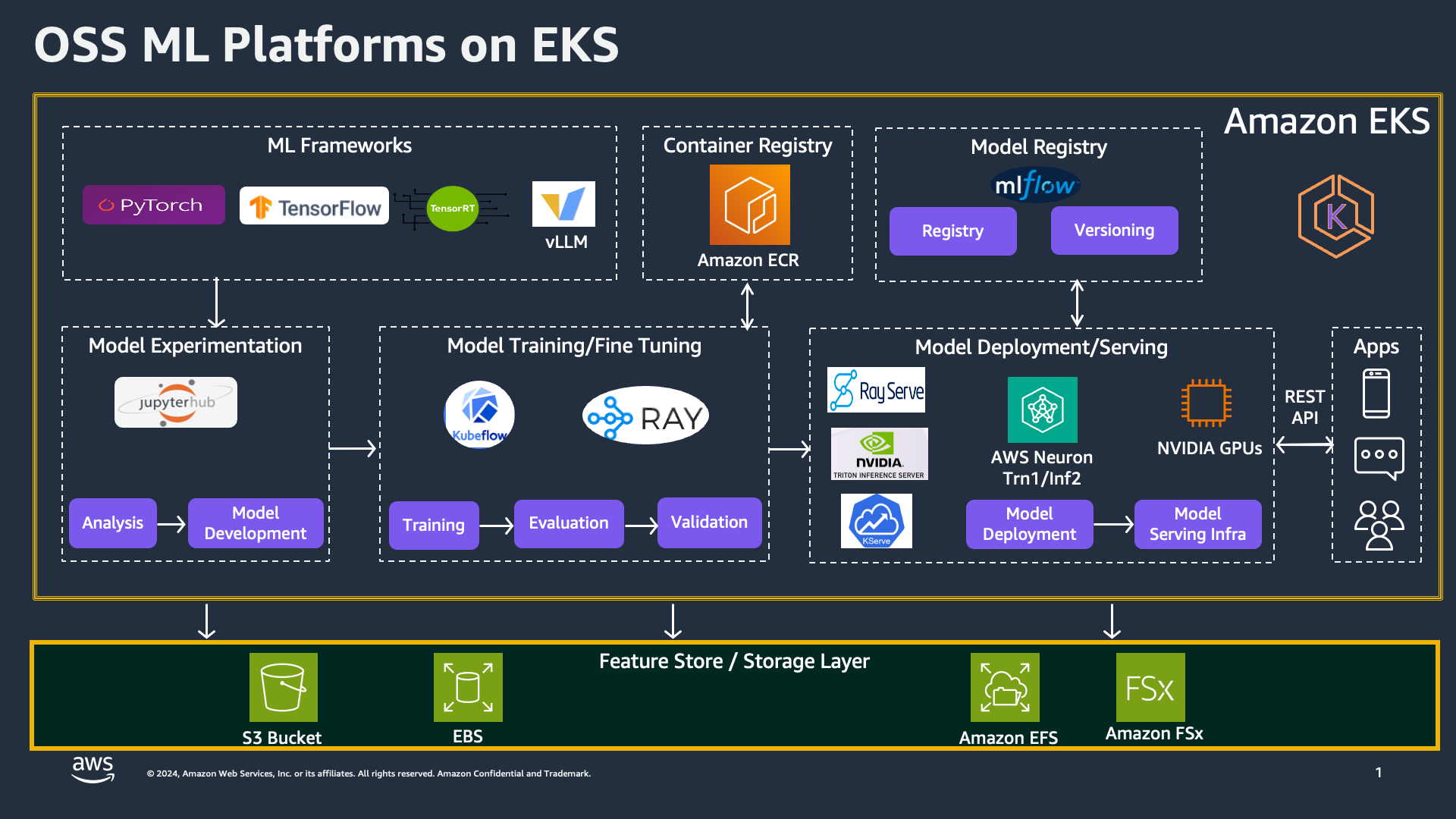
This architecture adds:
Ray cluster backend
Multi-model orchestration
Distributed inference
Autoscaling based on real load signals
Rolling model updates
Sharded model serving
This is ideal for:
Multi-tenant ML platforms
Large RAG fleets
Batch + real-time hybrid workloads
RayServe + vLLM is one of the most flexible LLM serving stacks available on AWS today.
6. Practical Recommendations for Production
1 — Use Bottlerocket GPU AMIs
Better isolation, faster boot, smaller attack surface.
2 — Enable Node Reuse with Karpenter
Avoid repeated image warm-up for large models.
3 — Store Models on EFS or Preload via S3
Cold-start latency kills SLAs; prevent it.
4 — Tune GPU Memory Allocation
--gpu-memory-utilization=0.90 usually works best.
5 — Enable Token Streaming for Low-Latency UX
Most enterprise users expect first-token response under 300–400ms.
6 — Add Observability Early
Track:
GPU memory
KV cache hits
QPS
Error rates
Tail latency
7 — Benchmark With Real Traffic Patterns
vLLM performance varies based on:
batch size
sequence length
sampling parameters
7. Example: LLaMA-3 8B on EKS with vLLM
kubectl port-forward svc/vllm-server 8000:80
Then call it like OpenAI:
curl http://localhost:8000/v1/completions \
  -H "Content-Type: application/json" \
  -d '{
        "model": "llama-3-8b",
        "prompt": "Explain Amazon EKS in 2 sentences.",
        "max_tokens": 100
      }'
vLLM handles batching and KV-cache reuse automatically.
Final Thoughts
vLLM on EKS is one of the most reliable ways to deploy LLM inference in production at scale. Whether you’re running a startup-grade chatbot or a multi-tenant enterprise GenAI platform, combining:
vLLM’s high performance
EKS’s operational maturity
AWS GPU infrastructure
Karpenter autoscaling
gives you a scalable, cost-efficient, and resilient architecture for modern AI applications.


